
Currently Empty: ₱0.00

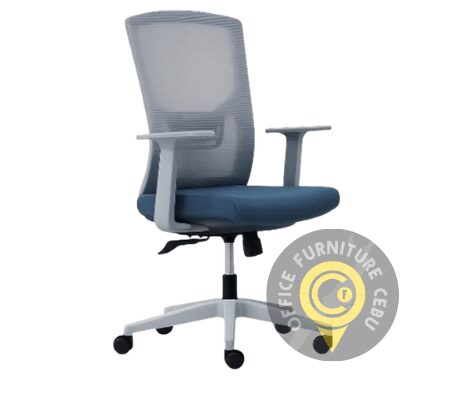
Are you looking for a durable and comfortable computer chair in Cebu? A suitable chair can make working, studying, gaming, and attending online meetings more comfortable. It can also help you maintain a better sitting position during long hours at a desk.
Computer chairs are available in many sizes, materials, and designs. Some are simple and affordable, while others include adjustable armrests, lumbar support, headrests, and reclining mechanisms.
At Office Furniture Cebu, we offer computer chairs for home offices, employee workstations, executive rooms, study areas, call centers, and commercial projects. Send us your requirements to request available models and a customized quotation.
What Is a Computer Chair?
A computer chair is designed for use at a computer desk or workstation. Unlike a fixed dining chair or visitor chair, it normally includes wheels, a swivel base, and adjustable seat height.
Many computer chairs also include features that support users who sit for several hours each day.
Common features include:
- Adjustable seat height
- Swivel mechanism
- Caster wheels
- Padded seat
- Mesh or upholstered backrest
- Lumbar support
- Fixed or adjustable armrests
- Reclining backrest
- Tilt tension control
- Headrest
The best chair depends on the user’s height, body size, workspace, and daily routine.
Why Invest in a Quality Computer Chair?
A computer chair is one of the most frequently used items in a home or office workspace. Therefore, it should provide more than a place to sit.
Here are some important reasons to choose your chair carefully.
Greater Comfort While Working
A supportive computer chair can make long working hours more manageable. The seat and backrest should support the user without creating excessive pressure.
A comfortable chair can be particularly valuable for office employees, remote workers, online teachers, designers, programmers, customer service representatives, and students.
Better Desk Position
An adjustable chair allows the user to sit at a suitable height for the desk. This can help keep the arms and wrists in a more natural position while typing.
The chair should also allow the user to see the computer monitor without constantly leaning forward or looking downward.
Easier Movement
Computer chairs normally include swivel bases and caster wheels. These features allow users to reach different parts of their workstations without repeatedly standing or twisting their bodies.
However, the wheels should match the flooring material. Some casters work better on tile, while others are designed for carpeted floors.
More Professional Appearance
Matching computer chairs can make an office look more organized. They can also complement your desks, cubicle partitions, storage cabinets, and other office furniture.
A coordinated workspace can create a stronger impression on employees, customers, and visitors.
Types of Computer Chairs Available in Cebu
Before ordering a computer chair in Cebu, determine how and where the chair will be used.
Mesh Computer Chairs
Mesh computer chairs are popular for offices in Cebu because their backrests allow more airflow. This feature can help users feel cooler during warm days.
Mesh chairs are suitable for:
- Employee workstations
- Home offices
- Call centers
- Computer laboratories
- Training rooms
- Shared offices
Some mesh chairs include fixed lumbar support, while more advanced models provide adjustable lumbar support and headrests.
Fabric Computer Chairs
Fabric chairs normally have padded seats and upholstered backrests. They can provide a soft and comfortable sitting experience.
Fabric computer chairs are available in various colors. Therefore, they can be selected to match a company’s interior design or branding.
However, fabric may require regular cleaning, especially in busy offices.
Leather-Style Computer Chairs
Leather-style computer chairs provide a more formal and executive appearance. They are commonly used in management offices, conference rooms, and private workspaces.
Many leather-style chairs include high backrests, padded armrests, and reclining mechanisms.
Before selecting this material, consider the temperature of the room and the chair’s expected daily use.
Compact Task Chairs
A task chair is a practical option for smaller workstations. It normally has a simple design, adjustable height, a swivel base, and caster wheels.
Compact task chairs can be used in:
- Small offices
- Reception areas
- Study corners
- Temporary workstations
- Computer shops
- Training facilities
They are also useful when several chairs must fit within a limited area.
High-Back Computer Chairs
High-back chairs support a larger portion of the user’s back. Some models also include a headrest or extended back support.
These chairs are suitable for users who prefer additional support during longer work sessions.
Executive Computer Chairs
Executive chairs are usually larger than standard task chairs. They may include premium upholstery, thicker cushioning, padded armrests, and multiple adjustment features.
They are often selected for managers, executives, business owners, and private offices.
Features to Look for in a Computer Chair
Not every computer chair offers the same level of comfort and adjustability. Compare the following features before ordering.
Adjustable Seat Height
The chair should allow the user to sit with both feet flat on the floor or on a footrest. The knees should remain in a comfortable position.
Seat height adjustment is also important because office desks are not always the same height.
Comfortable Seat Cushion
Look for a seat that provides support without feeling excessively hard or soft. A cushion that is too soft may lose its shape quickly, especially when used every day.
The seat should also be wide enough for the user without being too large for the workstation.
Supportive Backrest
The backrest should support the user while allowing comfortable movement. Some computer chairs include a curved backrest designed to support the lower back.
If several employees will share the chair, adjustable back support may provide greater flexibility.
Armrests
Armrests can support the forearms and help the shoulders remain relaxed. Depending on the model, armrests may be fixed, height-adjustable, or adjustable in several directions.
Check whether the armrests can fit underneath the desk when the chair is not in use.
Reclining Function
A reclining backrest allows the user to change sitting positions throughout the day. Some chairs allow free movement, while others can be locked at selected angles.
A chair with tilt tension control can be adjusted based on the user’s body weight and preferred level of resistance.
Stable Base
A computer chair should have a stable base that supports movement and rotation. Five-point bases are commonly used because they provide stability in several directions.
The chair’s recommended weight capacity should also be suitable for its intended users.
Durable Caster Wheels
Caster wheels should move smoothly without making the chair feel unstable. The appropriate wheel type will depend on whether the office has tile, wood, vinyl, concrete, or carpeted flooring.
Breathable Materials
Breathable materials are particularly helpful in Cebu’s warm climate. Mesh backrests promote airflow and are commonly selected for busy offices and home workspaces.
How to Choose the Right Computer Chair
Choosing the right chair requires more than selecting a color or design. Consider the following factors before placing an order.
Determine the Daily Usage
A chair used for one or two hours per day may not require the same features as a chair used for an eight-hour work shift.
For regular office use, prioritize adjustability, support, construction quality, and long-term comfort.
Identify the Main User
Consider the user’s height and body size. A compact chair may be suitable for one person but uncomfortable for another.
If multiple employees will use the same workstation, choose a chair with easy-to-use adjustments.
Measure the Workspace
Measure the height of the desk and the available space around it. Make sure the chair can move freely and fit underneath the desk when necessary.
You should also check the armrest height and the space between drawers, table legs, and other furniture.
Consider the Room Temperature
Mesh chairs are often suitable for warm environments because they allow air to pass through the backrest. Upholstered chairs may be preferred in air-conditioned rooms or executive offices.
Set a Practical Budget
Computer chair prices vary according to the materials, features, mechanisms, and construction quality.
Instead of choosing the lowest-priced model immediately, consider how often the chair will be used and how long you expect it to last.
Computer Chairs for Home Offices
Remote workers need chairs that fit both their bodies and their available space. A large executive chair may be comfortable, but it may not fit inside a small bedroom or study area.
For a home office, consider:
- Available floor space
- Desk height
- Daily working hours
- Preferred material
- Required back support
- Need for armrests
- Floor type
- Interior design
A compact mesh computer chair can provide a practical balance between comfort and space efficiency.
Computer Chairs for Corporate Offices
Businesses ordering multiple chairs should focus on consistency, durability, and ease of adjustment.
Before requesting a quotation, confirm:
- Number of employees
- Number of workstations
- Preferred chair style
- Required features
- Color requirements
- Delivery location
- Project schedule
- Target budget
Using matching chairs can create a cleaner and more professional office environment. It can also make future furniture planning easier.
Computer Chairs for Call Centers and Shared Workspaces
Call center employees and shared-office users may sit for extended periods. In addition, one chair may be used by different people across several shifts.
For these environments, consider chairs with:
- Simple adjustment controls
- Breathable backrests
- Durable bases
- Smooth caster wheels
- Supportive seat cushions
- Adjustable lumbar support
- Adjustable armrests
- Suitable weight capacity
A chair used during multiple shifts should be selected for frequent commercial use.
How to Adjust Your Computer Chair
A quality chair must be adjusted correctly to provide its intended benefits.
Follow these basic steps:
- Sit against the chair’s backrest.
- Adjust the seat until your feet rest flat on the floor.
- Keep your knees level with or slightly below your hips.
- Position the backrest so it supports your lower back.
- Relax your shoulders.
- Keep your elbows close to your body while typing.
- Adjust the armrests without lifting your shoulders.
- Place the monitor close to eye level.
- Position the keyboard and mouse within easy reach.
- Take regular breaks to stand, stretch, and walk.
Avoid sitting in one position for the entire day. Movement remains important even when you use a supportive computer chair.
How Much Does a Computer Chair Cost in Cebu?
The price of a computer chair in Cebu depends on several factors, including:
- Chair size
- Frame and base material
- Seat cushion
- Backrest material
- Adjustment mechanisms
- Armrest design
- Lumbar support
- Headrest
- Reclining function
- Weight capacity
- Required quantity
Simple task chairs are normally more affordable than high-back ergonomic or executive chairs. Larger orders may also require a customized quotation based on the quantity, specifications, and delivery location.
Send your requirements to Office Furniture Cebu to receive suitable product options and current pricing.
Ordering Computer Chairs for an Office Project
If you are furnishing a complete office, your computer chairs should coordinate with the rest of the workspace.
You may order chairs together with:
- Office tables
- Computer desks
- Office workstations
- Cubicle partitions
- Conference tables
- Filing cabinets
- Storage cabinets
- Reception furniture
Planning the furniture together can help you create a consistent layout and avoid problems with chair and desk dimensions.
Request a Computer Chair Quotation in Cebu
Whether you need one chair for a home office or multiple chairs for a corporate project, Office Furniture Cebu can help you find an appropriate option.
When requesting a quotation, please provide:
- Your name
- Company name
- Contact number or email address
- Required quantity
- Preferred style or material
- Required chair features
- Target budget
- Delivery location
- Preferred delivery date
Find a comfortable and functional computer chair in Cebu for your home, office, school, call center, or commercial workspace.
Contact Office Furniture Cebu today to request available computer chair models and a customized quotation.
